

Partner Solution Guide
Chakra Chat Partner Solution is, how it works, who it is designed for, and answers to common technical questions from partners.
Chakra Chat Partner Solution
Overview
The Chakra Chat Partner Solution is an API-first WhatsApp Business integration solution for businesses (SaaS, IT Service providers , ISVs, other) that want to embed WhatsApp messaging capabilities directly into their own product or platform.
Instead of building WhatsApp API infrastructure from scratch, partners use Chakra Chat as the underlying integration layer — managing their clients' WhatsApp Business Accounts (WABAs), automating messaging, and handling incoming events through Chakra's APIs.
Partners access and manage everything through a single partner account, with Chakra handling the API gateway, authentication, routing, and compliance with Meta's WhatsApp Business Platform.
API documentation link: apidocs.chakrahq.com
What You Can Do as a Partner
Embed WhatsApp SetUp
Chakra provides an Embedded Signup (ES) flow that you can integrate directly into your application. Your customers can connect their WhatsApp phone number and WABA from within your UI, without needing to visit Chakra's interface.
- Create and manage WhatsApp Channels and WABAs programmatically
- Add and manage multiple phone numbers across client accounts
- Control customer WhatsApp channels using plugins and APIs
Embedded Signup Integration Guide
Manage Multiple Clients
The partner architecture supports multi-tenancy. You can manage hundreds of client WhatsApp accounts from a single partner login using one API key for all client WABAs.
- Centralized API gateway for all client accounts
- Single partner-level API key for sending messages across all client WABAs
- Webhook routing per plugin, with WABA ID included in incoming payloads for identification
Automate Messaging
- Send broadcast and template messages
- Manage chat sessions with interactive media
- Configure chatbots and chat agent routing
- Listen to incoming messages via webhooks
- Use WhatsApp Flows
- Create and manage message templates via API
- Add leads to Chakra Campaigns programmatically
Track and Troubleshoot
- Access API logs for monitoring and debugging
- Build usage reports for client management
- Store your own copy of chat events using webhooks
Partner Pricing
Chakra Chat's pricing model is straightforward and partner-friendly. The Billing is Split for Product Subscription and Template Messaging Charges:
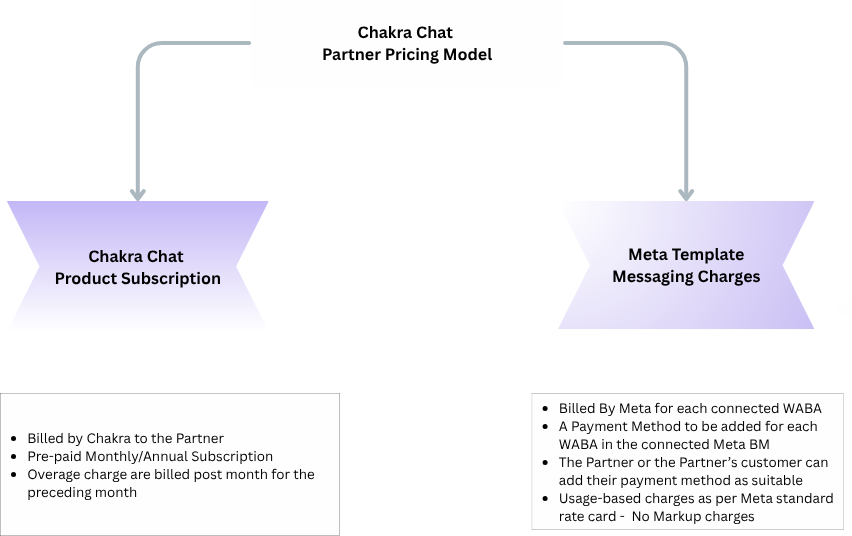
- Subscription-based: Subscribe to ADVANCED Chakra Chat plan ($49.99) to access all Chakra Chat Features
- For upto 12 Number use the Advanced Plan
- For additional number greated than 12, additional charges apply per connected number
- The following table provide the Partner Pricing rate for additional connected number as per a tier matrix
Tier | Connected Numbers | Extra Number Rate ($) |
Tier 1 | 13-49 | 3.25 |
Tier 2 | 50–249 | 2.75 |
Tier 3 | 250–499 | 2.25 |
Tier 4 | 500–999 | 1.75 |
Tier 5 | 1,000–4,999 | 1.5 |
Tier 6 | 5,000+ | 1.25 |
- Every Partner's Customer need to add a Payment Method in Meta Business Manager for Template Messaging Charges.
- Additional numbers: Add extra WhatsApp numbers beyond the base plan for just $3 per number - ideal for agencies and multi-client SaaS platforms managing many accounts.
- No markup on template messaging: Template messaging charges (Marketing, Utility, Authentication categories) are billed directly by Meta (WhatsApp) to your client's connected WABA at standard Meta rates. Chakra does not add any markup - saving your clients 20–25% compared to some other solutions.
This split billing model keeps your subscription costs predictable while ensuring your clients pay Meta directly for message consumption - a transparent, trust-building setup for agency-client relationships.
A 7-day free trial with full feature and API access is available, with the option to extend if you need more evaluation time.
Who This Solution Is For
The Partner Solution is designed for two types of businesses:
SaaS Providers
Software platforms serving specific vertical industries — such as spa management, clinic management, real estate, HR, field service, or e-commerce — that want to offer WhatsApp automation natively inside their product.
ISV (Independant Software Vendors)
Independent software vendors can integrate the Whatsapp Business Platform using Chakra Chat APIs within their product to add greater value to their existing solution.
Tech/IT Service Providers
IT service provider companies providing marketing , sales and engagement solution or managing the service for multiple clients.
Agencies and Marketing Platforms
Digital agencies and marketing technology companies that run WhatsApp campaigns, chatbots, and automated messaging on behalf of multiple clients.
✅ Good fit if you: Need to manage WhatsApp for multiple clients or end-users from one platform Want to embed WhatsApp onboarding and messaging inside your own product UI Require programmatic control over WABAs, templates, and messaging flows Are looking for scalable, API-first WhatsApp infrastructure without building it yourself |
Solution May Not Be Right Fit
Please review the following before proceeding with the Partner Solution:
1. Your clients want to use the Chakra Chat interface directly
The Partner Solution is designed for partners who embed Chakra's capabilities inside their own product. If your clients need access to Chakra's native UI for features like Chat inbox, Campaigns, or Chatbot management, a standard Chakra Chat subscription may be more appropriate.
2. You need unified billing for Meta messaging charges
Chakra charges a subscription fee directly to the partner. Meta's template messaging charges (Marketing, Utility, Authentication) are billed by Meta directly to each client's connected WABA at standard Meta rates — there is no markup. If you require a single consolidated invoice for both platform and messaging costs, this billing structure may not suit your needs.
3. You want to become a registered Meta Tech Provider
Chakra cannot register you as a Tech Provider or Solution Partner within Meta's ecosystem. You will operate as Chakra's partner, and your clients will register their WhatsApp numbers through Chakra's Embedded Signup. You will manage their accounts and messaging via Chakra's APIs.
⚠️ Before you proceed: Ensure your clients are comfortable with Meta billing them directly for template messaging Confirm your use case involves your own product UI — not Chakra's interface Review the pricing page for phone number limits per plan: chakrahq.com/product/chakra-chat/pricing/ |
Frequently Asked Questions
API and Authentication
Q: What is the API structure for sending messages through a specific client plugin? Is there one token per plugin or one token for the whole account?
You use a single partner-level API key for your entire account. The plugin ID is used as a routing parameter to direct the message to a specific client's WhatsApp number.
Full details are in the API documentation: Send Template Message for a Phone Number
Q: Does the incoming webhook payload include the plugin ID or WABA ID so I can identify which client the message belongs to?
Yes. The incoming webhook event includes the WABA ID, which you can use to identify and route messages to the correct client.
Q: Do we get direct access to raw WhatsApp Cloud API webhooks and endpoints, or are we limited to what Chakra exposes?
Chakra provides a comprehensive set of APIs for managing the WhatsApp Business Platform, including both Chakra-specific APIs and pass-through APIs for certain endpoints.
View the full API documentation
Onboarding and Embedded Signup
Q: When setting up a new client via Embedded Signup, does the business owner need to do anything themselves?
No additional verification is required from the client during setup. However, completing Embedded Signup on behalf of a client — even if you have access to their Facebook account — is not recommended. The client should ideally complete this step themselves.
Q: Can Embedded Signup be used on the Free plan, or does it require a paid plan?
Embedded Signup is available on all plans, including the Free plan. The number of WhatsApp phone numbers you can connect depends on your subscription tier.
Check the plan limits: chakrahq.com/product/chakra-chat/pricing/
Q: What does a client need to provide for WABA creation?
The following are required to create a WhatsApp Business Account for a client:
- Admin access to the client's Meta Business Manager (Facebook Business Manager). If no Meta Business Manager exists, a new one will be created.
- For Meta Business Verification: Certificate of Incorporation or Business Registration Certificate, and GST Certificate. The business name and address must exactly match what is entered in Meta Business Manager.
- A phone number owned and controlled by the client, not currently registered on WhatsApp or the WhatsApp Business App. If it is registered, it must be deleted before API onboarding. The number must be able to receive SMS or voice calls for OTP verification.
- A live website or active social media page that clearly displays the business name, contact details, and description of services. This information must match the legal documents and Meta Business profile.
Template Management
Q: Can I create a template once and use it across all client WABAs?
You can create templates programmatically using the Chakra API. The recommended approach is to save your template parameters and use the API to create the same template across each new WABA as needed.
Template cloning via API is on the product roadmap and not yet available. Once available, it will be accessible on all plans. Template creation via API is already supported.
Q: When a template is created for a new WABA, does it require a new Meta approval?
Yes. Meta requires separate approval for every template on every WABA. Approval is not inherited, and cloned templates are treated as new submissions by Meta — the approval timeline is the same as for a fresh template.
Q: Can template cloning be done via API or only through the UI?
Currently, template cloning is available through the Chakra UI only. A template cloning API is planned for a future release.
WABA Ownership and Portability
Q: Who owns the WABA when a client connects their number — our Meta Business Manager or Chakra's?
The WABA is associated with the Meta Business Manager selected during the Embedded Signup process. Ownership is determined by which Meta Business Manager is used at the time of registration — not Chakra's.
Q: If we move away from Chakra, can clients port their WhatsApp numbers to another provider?
Number portability is supported. Your clients will not lose their phone numbers when moving to another BSP. The table below outlines what is and is not retained during porting:
Item | Standalone WhatsApp Business API | WhatsApp Coexistence API |
|---|---|---|
Number Retained | Yes | Yes |
WABA | Retained | Disposable WABA — a new WABA is created during porting |
Chat History | Cannot be migrated once ported to another BSP | Can be migrated once reconnected with another BSP |
Message Templates | Retained | As WABA is reset, existing templates will not carry over |
To minimize data loss, partners are advised to subscribe to Chakra's webhook events and store a copy of chat data on their own servers. See the API documentation for webhook setup.
Branding and Data
Q: Does Chakra branding appear anywhere in the experience visible to my clients?
Chakra branding appears only during the Embedded Signup (ES) flow. This is a Meta-standard module and the branding cannot be removed.
Outside of the Embedded Signup, Chakra branding is not visible to your clients — since the Partner Solution is designed for partners who embed the functionality inside their own product interface.
Q: Who owns the conversation history, contacts, and media data — us or Chakra?
Data is stored on Chakra's servers, but ownership belongs to the partner. You can export or retain your own copy of all data at any time by subscribing to Chakra's webhook events.
Refer to the API documentation for webhook setup: apidocs.chakrahq.com
Compliance and Infrastructure
Q: Where does Chakra store message data and conversation logs?
All data is stored on AWS infrastructure, in the AWS Datacenter located in Mumbai, India.
Q: Does Chakra provide a Data Processing Agreement (DPA) for DPDPA 2023 compliance?
🕐 In Progress Chakra's compliance team is currently reviewing DPA requirements under India's Digital Personal Data Protection Act (DPDPA) 2023. A response will be provided once the review is complete. Please contact Chakra support for the latest status. |
Getting Support
Chakra's technical team handles partner tickets for integration issues, feature requests, and urgent incidents.
- Standard plans: Support via ticket system
- Advanced plans: Priority ticket handling with direct technical team access
To raise a support request or contact the team, visit chakrahq.com or reach out through your partner account.