

WhatsApp Chat QR code
Make it easy for customers to reach you on WhatsApp with a custom QR code! 🎯 Chakra provides a free tool to generate a branded QR code linked to your business WhatsApp number.
📱 Generate a Custom WhatsApp QR Code
🔧 How to Generate Your WhatsApp QR Code
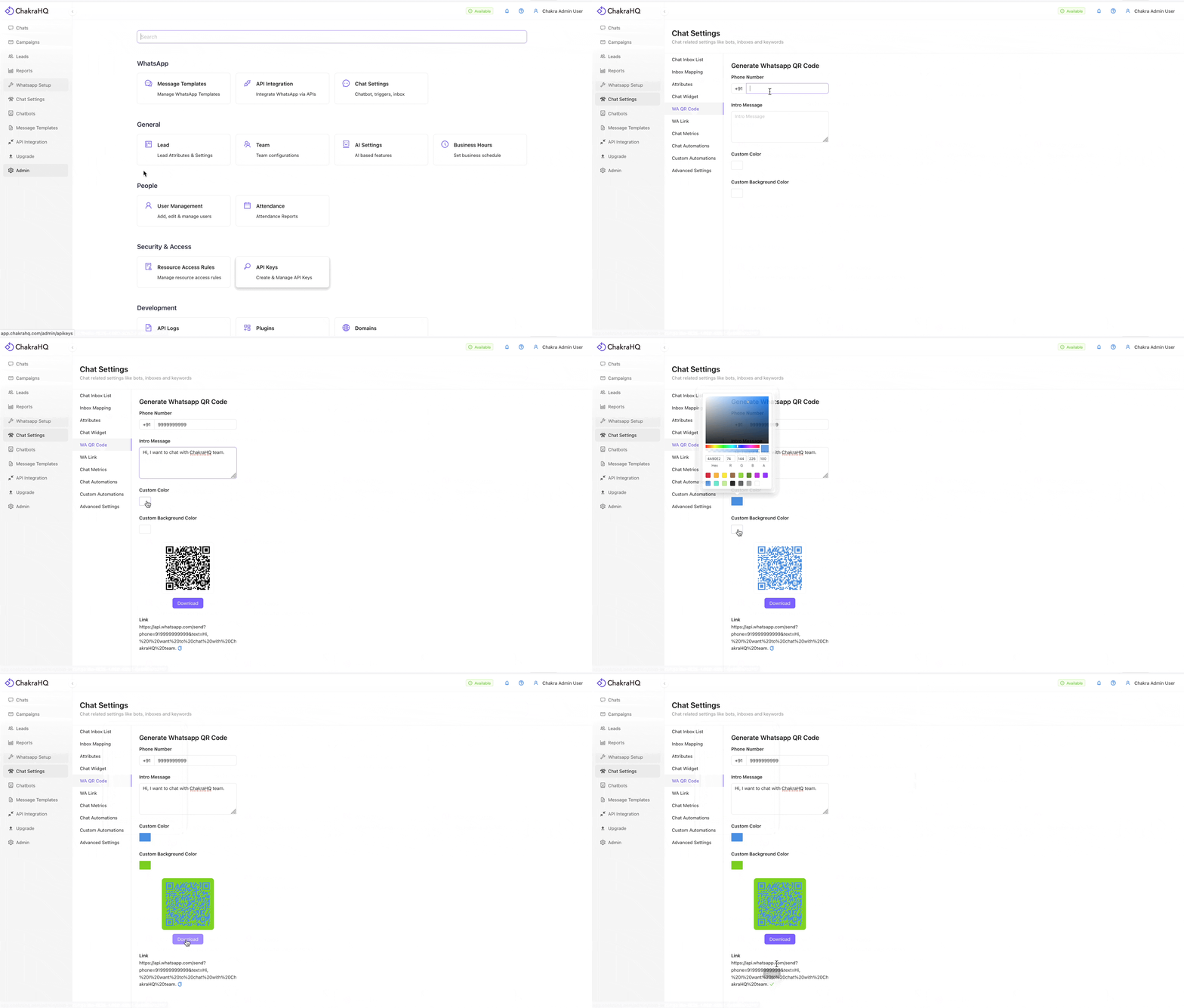
- Head to Admin > Chat Settings > WA QR Code.
- Under Phone Number, enter your business’s WhatsApp number.
- In the Intro Message field, type a short, friendly message that customers will send when they scan the QR code.
- 🚀 Your QR code will be automatically generated at the bottom of the page.
🎨 Customize Your QR Code
You can tweak the design to match your brand:
- QR Code Color – Choose a color that fits your brand theme.
- Background Color – Set a background color that makes your code pop!
📥Download and Share
Once your QR code looks perfect, download it and place it wherever your customers are—flyers, packaging, storefronts, or online!
Mobile App
Detailed guide to Chakra Chat Mobile App for managing customer chats and leads.
Setup Website Chat Widget
Along with WhatsApp, Chakra also enables you to create a Website Live Chat Widget - allowing your customers to chat with you directly from your website or landing page. All chats (website + WhatsApp) appear in the same chat inbox for easy management. This guide details wow to setup a website chat widget