

Shared Chat Inbox: Feature
Detailed Feature List of the Shared Chat Inbox feature
Shared Chat Inbox Introduction
Tired of juggling multiple phones, tabs, and platforms to talk to customers? The Chakra Chat Dashboard is your single, powerful command center for all WhatsApp business messaging and beyond. We bring every customer conversation - from WhatsApp to website chat widget - into one intuitive, collaborative, and efficient workspace. Eliminate the chaos of scattered chats in multiple inbox or WhatsApp Business apps and unlock the productivity of a truly unified customer communication hub for sales, service and operations use cases.
Key Value Proposition: Consolidate. Collaborate. Convert. Manage all your messaging channels from one dashboard, empower your team with smart tools, and turn casual chats into qualified leads seamlessly.
Feature Overview
The Chakra Chat Dashboard isn’t just another inbox; it’s the operational heart of your customer messaging. It’s built for teams to deliver faster, more consistent, and more insightful customer experiences.
- Centralized Messaging Hub: Ditch the device-hopping. Access all conversations from connected WhatsApp numbers and your website chat widget in one clean, unified thread. Future-ready for Instagram, Facebook Messenger, and Telegram.
- Intelligent Conversation Management: Find any chat in seconds with powerful search and saved filters. Ensure no customer is left waiting with smart, rules-based automatic chat assignment to the right team member.
- Conversation-to-Conversion Engine: We bridge chat and CRM. Automatically create a lead profile from every new contact, giving your sales team instant context and a seamless path to follow-up, directly from the chat window.
- Speed at Your Fingertips: Boost agent productivity with one-click actions - send quick replies, fire up the chatbot, share product catalogs, or get AI-assisted response suggestions without ever leaving the flow.
- Deep Organizational Control: Go beyond basic labels. Create custom chat attributes (like “Order Value,” “Issue Type,” or “Priority”) to categorize, segment, and filter conversations with the precision your business needs.
Detailed Feature Introduction
Shared Chat Inbox Demo
[ ](https://www.youtube.com/watch?v=PD8fqN1vCrM\&list=PLaOuF5cTA3a92CRRCeeDXJYiX0rrpo5R6\&index=3)
1. The Central Messaging Hub
Your unified central control system for all customer interactions.
- All Incoming Chats, One Dashboard: View and manage conversations from every connected channel and Handle/Number in a single, unified dashboard.
- Connect Multiple Numbers & Channels: Operate several WhatsApp business numbers and your native website chat widget simultaneously. (More channels coming soon!).
- Smart Work Distribution: Use Automated Chat Assignment to route conversations based on rules (e.g., channel, number) or Manual Assignment for direct hand-offs, ensuring balanced workloads and expert responses.
2. Search, Filter & “Spaces”
Find the signal in the noise. Instantly.
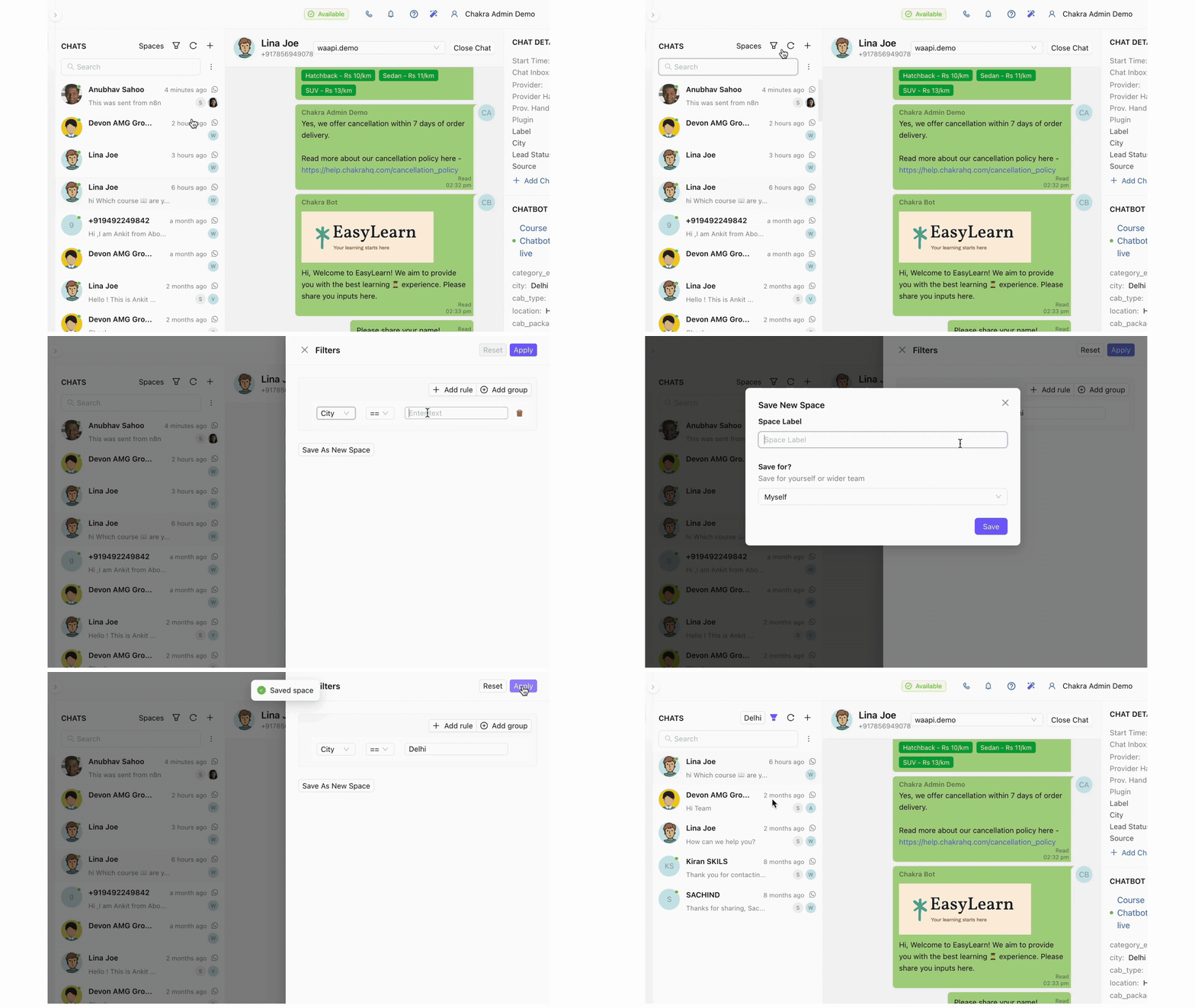
- Universal Search: Access all past or active chats instantly using a contact’s name, phone number, or just scrolling down the Chat List.
- Dynamic Filtering: Segregate chats by status (Open, Closed, Unreplied), assignee, channel, or any custom attribute for clear views.
- Saved Filters as “Spaces”: Turn your most-used filters into permanent workspaces like “Today’s High-Priority,” “Sales Inquiries,” or “My Open Chats” for personalized, one-click access to the conversations that matter most to you.
3. Conversation Window: Quick Actions
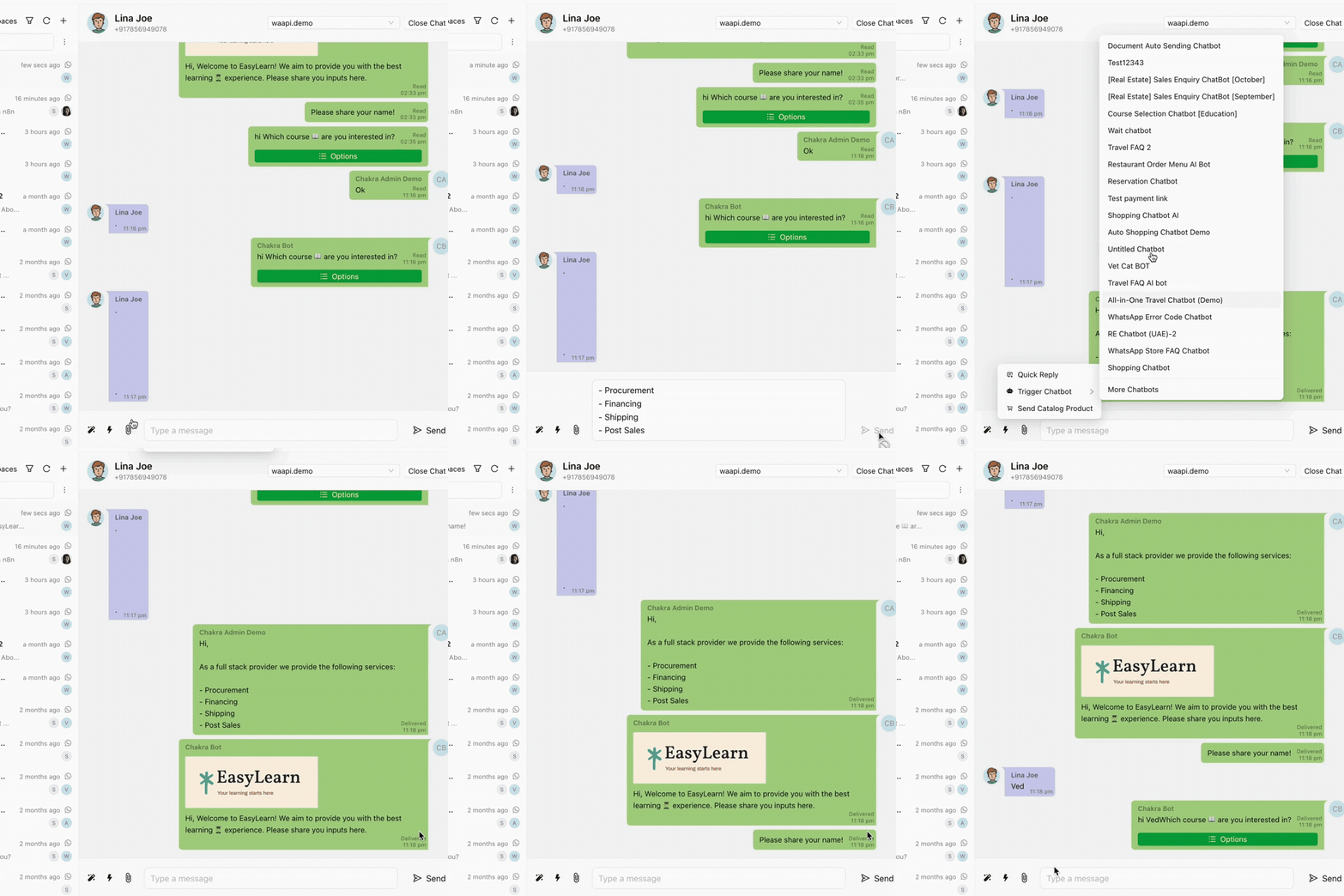
Where meaningful customer engagement happens.
- Conversation Lifecycle Control: Manually Close a resolved chat or Re-open it with a click, keeping your active list clean.
- Rich Media & File Sharing: Use the attachment button or simple drag-and-drop to send photos, videos, audio notes, and documents. Support multiple files in one go.
- Quick Chat Actions Bar: A toolkit for efficiency:
- Quick Replies: Deploy pre-approved responses to common questions.
- Manual Chatbot Trigger: Hand off automation anytime with “Activate Chatbot.”
- Product Catalog Sender: Share your catalog directly in-chat to drive sales.
- AI-Assist: Get smart reply suggestions to maintain quality and speed.
4. Chatbot Integration & Control
Seamless human + automation handshake.
- Chatbot Control: See the Active Chatbot’s name at a glance. Stop the automation with one click to take over personally.
- 1-Click Chatbot Editor Access: Jump directly to edit the active chatbot flow for instant optimization.
- Capture Chatbot Responses: Automatically save customer answers from the chatbot as structured data (e.g., “Product Interest = Chakra Chat”) for personalization and lead scoring.
5. Chat To Lead Integration
Beyond Chats, Manage full Customer profile from the Chat Dashboard
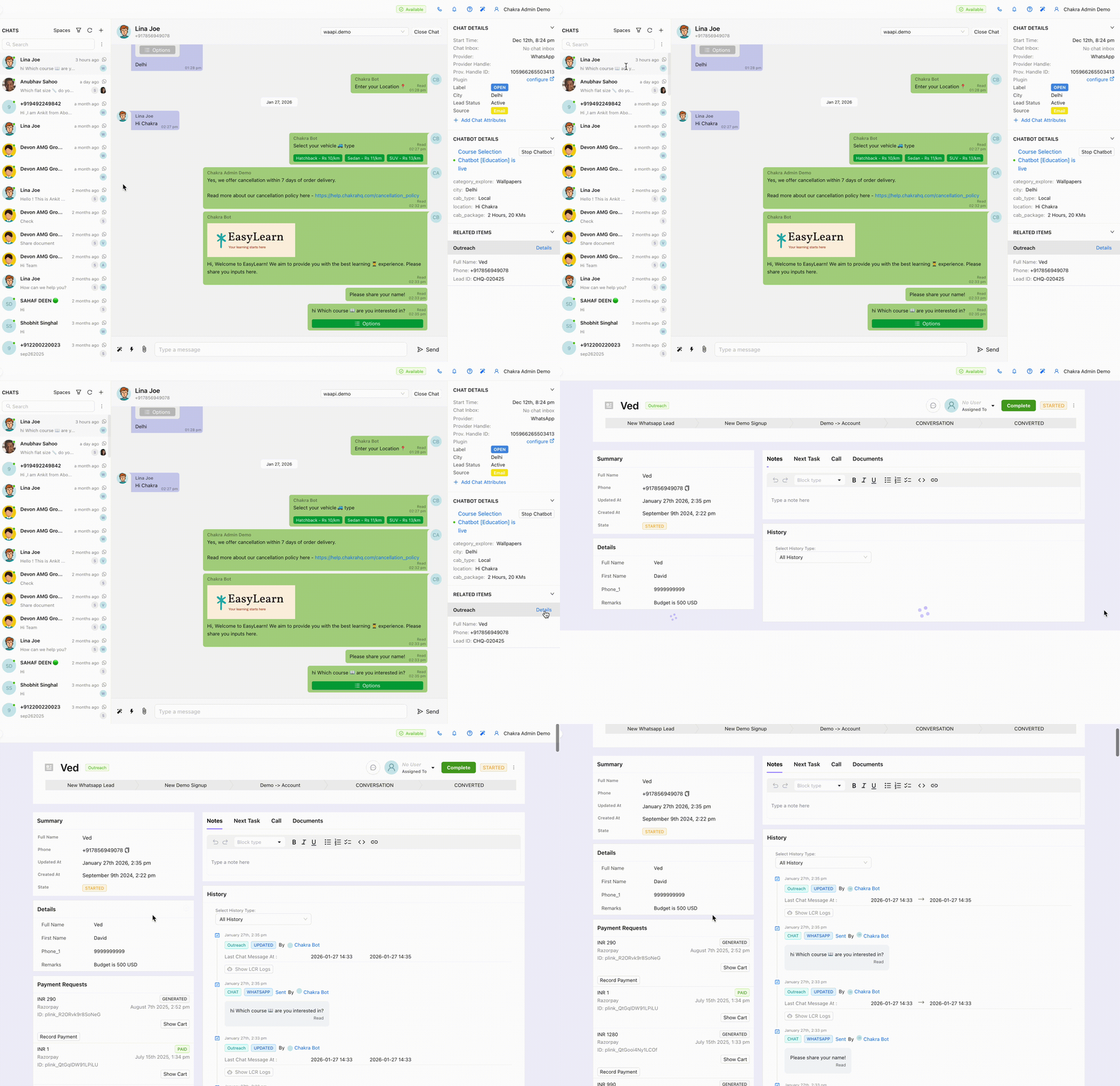
- Automated Lead Creation: Every new chat contact automatically generates a lead card in your integrated CRM, capturing their identity and conversation history from day one.
- In-Window Lead Access: Click the lead summary (Name, Phone, Lead ID) within the chat to view the full lead profile without switching apps.
- Manual Link/Create: Flexibly link an existing lead or create a new one manually for full control.
6. Chat Labels & Custom Chat Labels
Organize beyond the basics. Your way.
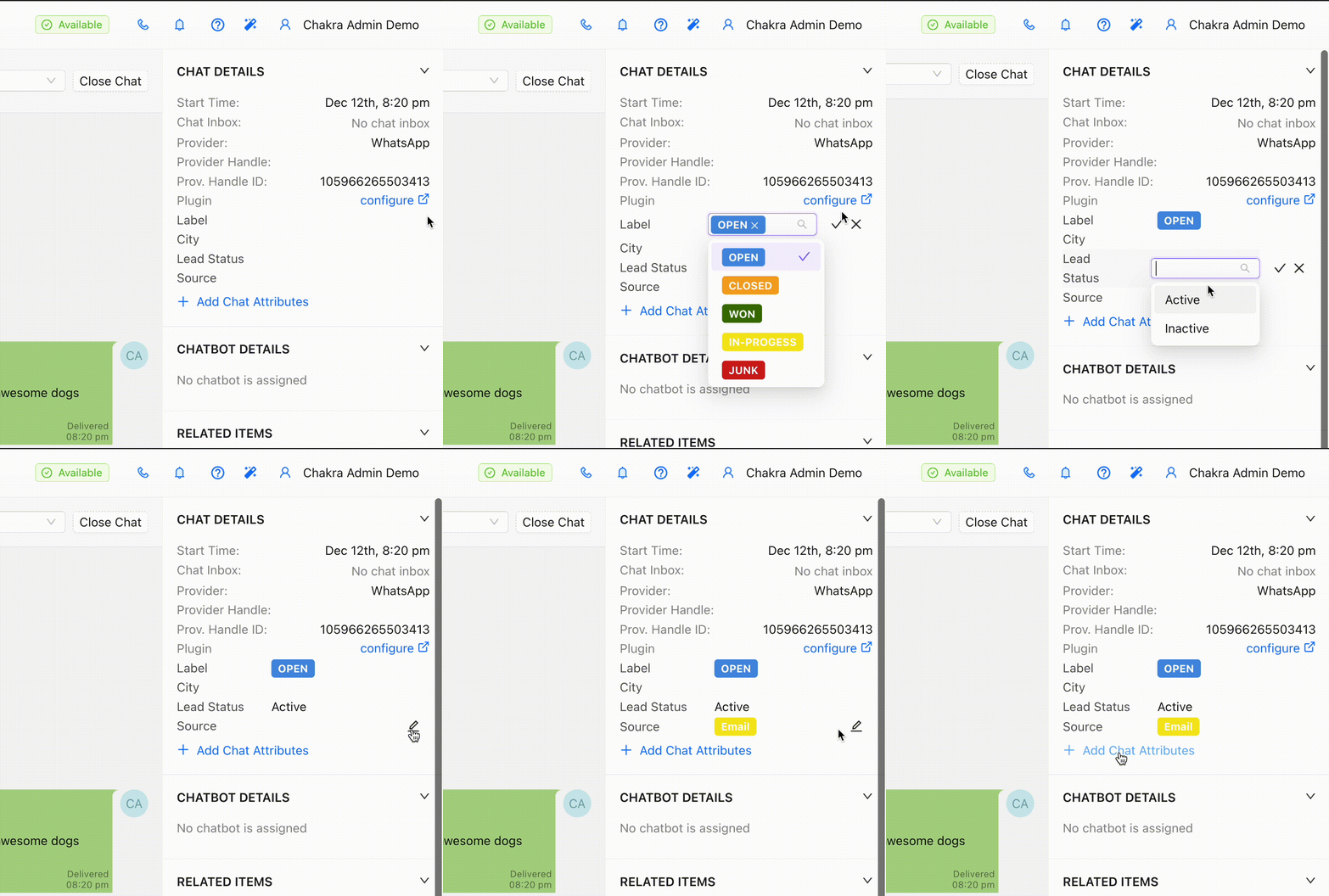
- Create Chat Label Attributes: Define chat attributes using all field types - Text, Number, Date, Dropdown - to track what’s unique to your business (e.g., “Project Code,” “Customer Tier,” “Subscription End Date”).
- Pre-defined Chat Label Values: Add dropdown options to ensure clean, reportable data.
- Filter with Chat Labels: Filter your entire chat dashboard using these custom attributes to generate focused lists, like “All chats where ‘Issue Type’ = ‘Billing’.”
7. Dashboard Settings & Management
Manage Chat Dashboard accesss for your Team across the hierarchy.
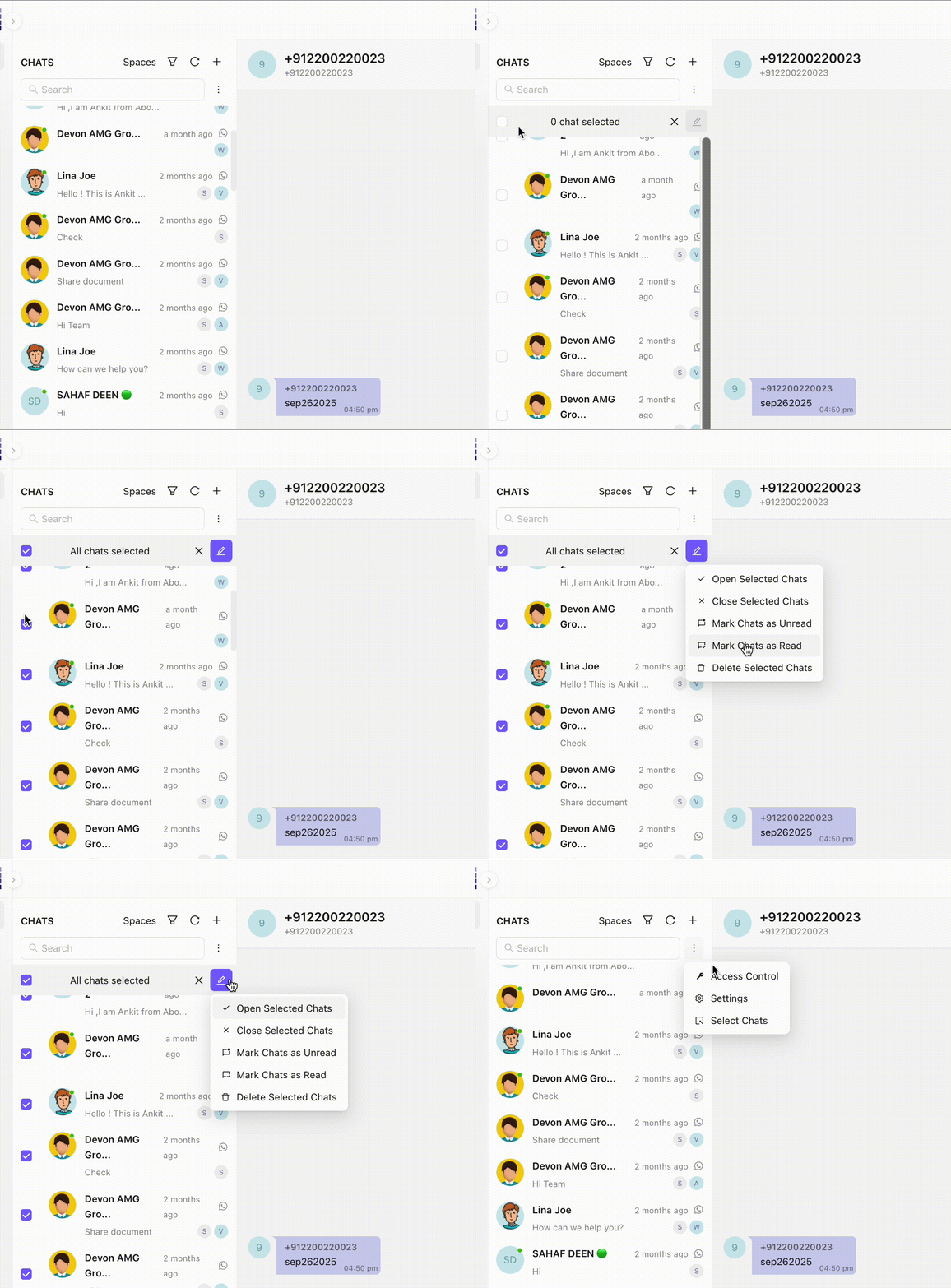
- Granular Access Control: Define who sees what with Role x Inbox permissions (e.g., “Sales sees all chats,” “Support sees only assigned chats”).
- Bulk Chat Actions: Save hours with Select All, Open, Close, or Archive actions applied to multiple chats simultaneously.
All-in-One Chakra Chat Dashboard
The Chakra Chat Dashboard is more than a feature; it’s a transformation in how you engage with customers on WhatsApp and other chat channels. It replaces fragmentation with unfiied focus, and manual work with structured and 1-click quick action features. You’ll reduce chat response times, improve team collaboration, never lose a conversation, and build a richer understanding of every customer - directly from the chat where the relationship begins.